 Evidence Engine
Product
Evidence Engine
It records what a scan opened, what failed, and whether a later check still saw the failure. It does not change the site.
The Evidence Pack
One export builds one zip for the scan you just ran:
- evidence-report.pdf — findings ordered high, medium, then low, with the screenshot where the page was loaded; a broken link shows its status and the 3-of-3 result instead. The report also includes the address, the outcome, and what was covered and what was not.
- audit.csv — every check the scan attempted or skipped, and the reason. A check you switched off is not a row: it is named as "Not run" in the scope statement in the report and in audit.json, so it is never shown as passed.
- audit.json — the same record, plus the scan's configuration.
- screenshots/ — the screenshots, named by an evidence id that audit.json and the handoff viewer cite; the PDF shows each one beside its finding. A link that was only requested, never opened as a page in the browser, has no screenshot file; a failing page the scan did open, such as one that answers 404, has one.
- README.txt and handoff/index.html — what the pack contains, the scan's scope and limits, and an offline viewer a recipient can open without Evidence Engine.
- environment-comparison/ (only when you made a staging-to-production comparison) and site-analysis/, accessibility.csv, visual-comparison.csv (only when those optional parts were chosen or ran).
- MANIFEST-SHA256.txt — a SHA-256 hash of every file in the pack. It is a local record, not a compliance certificate.
Demo — scan of a test site
Demo — scan of a test site. 83 seconds, captions on, no sound. The real application scanning a local test site that this project controls: the scan, a finding and its reason, the Evidence Pack export, the developer's fix, and the recheck.
What was shortened, and the transcript
Some waiting is cut so the film stays short. Every cut is marked on screen and in the captions:
- The scan wait is played at 3 times speed (the scan took 24 seconds in real time). A label on screen says so while it plays.
- A few screens are held a moment longer so they can be read. Nothing else is cut, sped up or reordered.
- The card before the rechecks is not part of the app. Each recheck took about 2 seconds in real time and is shown at that speed.
00:00Evidence Engine 0.2.0, build 0a8c9ca0. A scan of a local test site this project controls: up to 4 pages and 6 links, depth 1, 5 minutes.
00:00The scan runs, shown at 3 times speed. It took 24 seconds.
00:07Scan complete: two findings.
00:11Finding 1, high: a JavaScript error on the contact page, with its reason and steps.
00:18Finding 2, medium: the Q3 report page returns HTTP 404 on 3 of 3 re-tests. Confirmed.
00:28Site pages and technical audit. The scan has to be declared a staging copy or the live site first, because the same page can be right on one and wrong on the other.
00:37The site graph: the pages this scan opened and the links between them, from the start page. It shows only what the scan reached.
00:46The audit log lists every check attempted or skipped.
00:52Export the Evidence Pack: report, audit files, screenshots, SHA-256 manifest.
00:58The developer fixes the test site. Evidence Engine does not edit it.
01:03Recheck: the link loads. One clean recheck reads Not reproduced yet.
01:09A second clean recheck reads Resolved. It takes two in a row.
01:14The script error reads Not reproduced yet. Not seen again is never marked Resolved.
An earlier sample, kept as it was
This capture and pack are older than the film above. They are kept because they show a request-only broken link with no screenshot file, and they keep their original attribution.
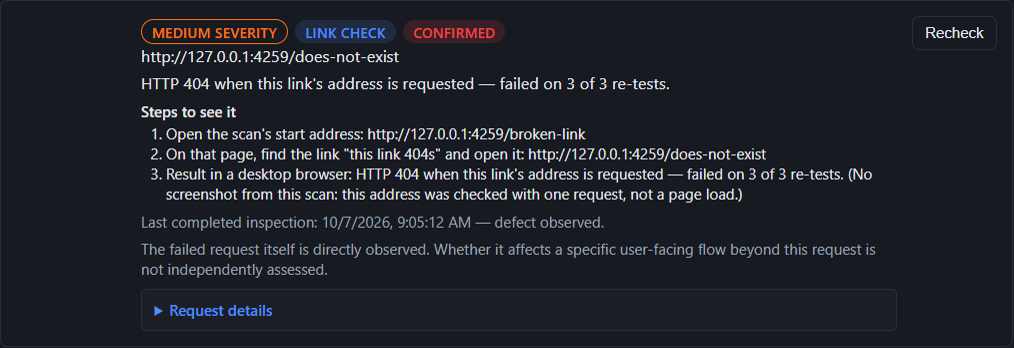
Demo — scan of a test site. Reason: HTTP 404 when this link's address is requested — failed on 3 of 3 re-tests. The steps in the capture name the test page, the link that was opened, and that result.
The broken-link sample uses HTTP evidence and contains zero screenshot files. It does not demonstrate every supported check.
This capture and its Evidence Pack are from unpackaged build 9cc1a2a7, scan bbfc776c-066b-4262-aeb4-d2a46582585f. They were not regenerated for a later build.
Demo Evidence Pack (.zip) — the PDF, audit.csv, audit.json, and MANIFEST-SHA256.txt from this scan.
What a scan checks
- Pages and same-site links that return an error. Timeouts, unexpected redirects and rate-limiting are reported as "unable to verify", never as defects.
- Images, scripts, and other resources that fail to load.
- Uncaught JavaScript exceptions and
console.errormessages during the load. Passwords, tokens, and API keys in that error text are redacted before they are saved. - Horizontal overflow on the pages it inspected, at desktop size (1280×800) and in a separate phone browser (Chromium mobile emulation: 390×844, device scale 3, Chrome on Android identity, touch). That phone pass revisits pages already opened. It does not start a separate crawl. It is not the phone-width picture used by visual comparison.
- A recheck after a fix. The report says the defect is still present, resolved, not reproduced yet, or unable to verify. Resolved takes two clean checks. A login wall or a 403 is not counted as fixed. A JavaScript exception stays "Not reproduced yet" when a later check does not see it. Absence alone does not make it Resolved.
- Password-protected staging. HTTP Basic Auth is typed into Evidence Engine and kept in memory for that session; it is not written to disk. Evidence Engine does not collect the website-login password. You enter it directly into the isolated browser.
Severity comes from what the scan observed. A confirmed server error (a 500 that shows an application error) or an uncaught exception is high. A 4xx or a console.error is medium. A failed image or script, or horizontal overflow, is low. Responses of 502, 503 and 504 are never defects.
How it avoids false alarms
- A suspected defect is re-tested 3 times on its own address. The scan confirms up to 50 of them. Anything past that budget is listed as unconfirmed, not as a confirmed defect.
- Seen on all 3 tries, it is Confirmed. Seen on 1 or 2, it is Intermittent. A timeout, an unexpected redirect, or a block is Unable to verify, and is not a defect.
- A rate limit or a firewall page is never a defect. The scan slows down and stops if the site keeps throttling.
- Each finding shows numbered steps for the pages the scan opened, and the measured reason.
Limits
- Scan only a site you own or are authorised to test.
- Pages are opened on the same site only. Links to other sites are not crawled; an optional check can ask whether some of them answer (see "More in this build"). A page you scan still loads its own scripts, images and fonts from whatever hosts it uses, as it would in any browser; see Privacy.
- On a full license, presets are 10, 30, and 50. A typed scan stops at 200 pages, 500 link checks, depth 10, and 30 minutes, whichever limit it hits first. It will not run without a limit.
- On a trial, presets are 10 and 30. A trial scan stops at 30 pages, 30 link checks, depth 2, and 10 minutes, and a custom list stops at 30 addresses.
- A custom list can name up to 200 addresses. That list is not crawled onward.
- It does not submit forms, and it does not click through buttons, carts, or checkouts. Pages that only appear after a login are not crawled unless you sign in yourself for that scan.
- It confirms up to 50 candidates. Anything past that budget is listed as unconfirmed, not as a confirmed defect.
- The report says when discovery stopped before every link was found, and how many eligible links were not visited.
Evidence Engine is not a security scanner, not a load test, and not a crawl of every state of an application. It is not uptime monitoring and not a full SEO suite: the technical audit reports what it read on the pages it opened, with the limits stated.
Optional checks
These checks stay off unless the scan turns them on. Neither one certifies the page, repairs it, or covers every problem.
- Automated accessibility check. Optional. When it is on, the scan runs unmodified axe-core rules inside the page it already opened. It can report rule violations and rules it could not decide. It cannot say the page conforms to WCAG. It does not repair anything. No reported violation is not a complete check and not a certification. The check has no complete-coverage guarantee.
- Visual comparison (local). Optional and off by default. It compares a picture of the page with one approved earlier on this PC, at desktop size (1280×800) and at phone width 390×844 in the same browser, with no touch and no mobile identity. That phone-width picture is not the mobile-emulated overflow pass above. A pixel or size difference is a change that needs review. It is not, by itself, a defect. A match does not show that the page works. Screenshots can contain private page content, and nothing is redacted automatically. The comparison has no complete-coverage guarantee.
These optional checks are not an accessibility audit and not a visual-regression certification. A person reviews a visual change. Nothing in the scan rewrites the page.
More in this build
Added after the first version, each with its limits. They were built and tested on a development build; the installer is not public yet, so none of this is available to download.
- Technical audit. Titles and meta descriptions, headings, robots directives and canonical addresses, exact and near-duplicate text, JSON-LD structured data, and phone-browser checks (viewport, touch-target and text size, overflow). Results are grouped as confirmed problems, warnings, items for review and information. Length and similarity items are heuristics, labelled as such. You declare whether the scan covered a staging copy or the live site, because that changes what a finding means. It judges only the pages the scan opened.
- Site graph and structure. A graph of the pages the scan opened and the links between them (up to 150 drawn), with filters, a shortest click path between two pages, and a plain list for keyboard and screen-reader use; also click depth and an address tree.
- Custom search and extraction. Up to 10 text or regular-expression rules and CSS or XPath extraction rules over the rendered page. A page cut at the read limit is reported as not evaluated, never as clean.
- robots.txt. See what a crawler would be told, and choose whether a scan respects the file for the addresses it discovers. The start address and any list you give are always opened. A file that cannot be read is reported as not evaluated.
- Links to other sites (optional). By default the addresses of links to other sites are listed and not checked. If you turn the check on, after the scan up to 25 linked addresses on other sites (25 by default, never more than 100) are asked, anonymously, whether they answer: a HEAD request, then a GET if the site refuses HEAD, following redirects within that site only and reporting, not following, a redirect to a third site. No login, cookie or credential is sent, those sites are not crawled, and a site that refuses automated requests is shown as not verified, not as broken.
- Sitemap file. Save a sitemap.xml built from the pages the scan reached, with every excluded page counted and its reason.
- Projects, saved settings and history. Named projects, named saved settings that never contain a login or token, search across past scans, reopening and comparing scans, and exports by scan.
- Command line and local schedules. Run a scan from a terminal with exit codes and a result file, and keep hourly, daily or weekly schedules. Nothing runs by itself: a schedule fires when its run command is started, by you or by a Windows task you create. Unattended scans use a public site or HTTP Basic Auth from environment variables.
- Results workspace. A bar at the top keeps the one address field, Scan, Cancel and the licence status in view; the scan settings open in a side panel; findings, including thousands of them across earlier scans, can be searched and filtered by severity, check and text across every page (the filter is answered for the whole set and the status line says how many match), moved through with the keyboard, and the result sections can be shown one at a time. Each finding keeps its reason, steps, evidence and Recheck.
- Bulk availability check (command line, full license). Checks whether up to 5,000 web addresses answer, as one job that can be paused, resumed and recovered after a crash. It records one availability result per accepted unique address, checked anonymously: a check may use a HEAD request followed by a GET, and an interrupted check may be retried after a crash, so the number of network requests can be higher than the number of addresses (a 50,000-address test on this PC sent 50,500). It opens no browser, and says nothing about how a page looks, works or scores on accessibility. It was demonstrated on a test site on this PC (5,000 and 10,000 addresses, with a stop and a resume), not on live sites, so real timings will differ. The trial does not include it.
- Staging-to-production comparison (History screen and command line). In History you pick one saved full scan of each site and, if you want, a path mapping; the command line compares the latest completed scans of two sites you name. Either way the result names both scans, their dates and their coverage. It reads stored results only: no request is made and no login is copied from one site to the other. A page not seen on the other side is reported as not seen, never as missing, and a page that nothing links to is called a potential orphan only with the crawl's coverage and how the page was found (the sitemap, a list, or not recorded) stated. The latest comparison is carried into the PDF report, the Evidence Pack (as a hashed CSV and JSON) and the client summary of the staging site's export, with a note, naming both scans, when it was made from a different staging scan than the one exported (earlier or later is said only when the dates show it). Addresses are shown the way the app shows them, and a secret inside the path of an address, in page text or in a screenshot is not removed.
- PageSpeed Insights (optional). Sends the address you choose to Google, only after you agree, and shows Google's lab and field results separately. It has been tested against a stand-in for Google's service; a real run needs your own Google key and has not been verified yet.
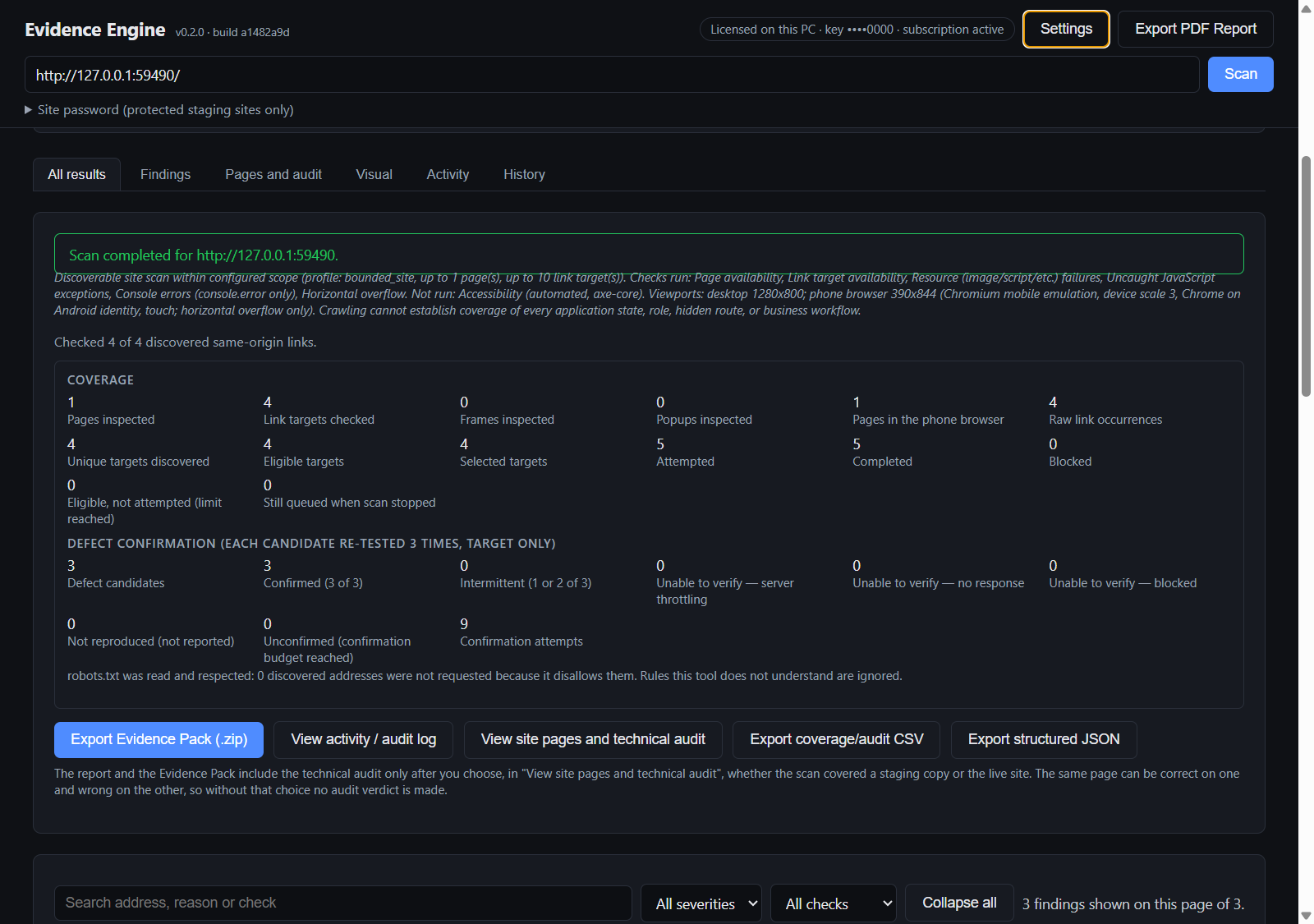
Not in this version: hreflang auditing, AMP validation, spelling and grammar checks, custom JavaScript snippets, OpenAI or Gemini integration, Google Analytics, Search Console, backlink data, and Looker Studio. These are choices, not oversights.
This is not a claim to match any other tool. Several of these checks are shallower than a dedicated tool's, and each limit is listed on this page or in the application.
Where the scan goes
The scanner, the database, the screenshots, and the exports stay on the PC. The site you scan only needs to be reachable from that PC. The app contacts Lemon Squeezy to activate a license and, about once every 7 days at the start of a scan, to re-check it. Details are on the privacy page.
Requirements
Windows 11 x64. Windows 10 will be listed after it has been verified. About 0.8 GB disk (the unpacked app measures 812 MB); 8 GB RAM or more recommended; internet for activation and the weekly license check. The installer includes its own browser engine.
Availability
$299/year for one Windows user on one PC.
Checkout not open yet. This site does not take payment.
Trial coming soon. The 7-day trial link is not open.
Lemon Squeezy adds any sales tax or VAT at checkout and emails the license key. Another Windows user on the same PC does not inherit the license. Checkout, the trial, and the installer stay unavailable until the signed build and the live products are published.